Now available. DeepFiles is live on the Salesforce AppExchange — install it in your org today. Install now →
Salesforce File Rollup

See every related file, right on any record.

DeepFiles aggregates Salesforce Files from across your related records — Accounts, Contacts, Cases, Opportunities and beyond — into one searchable, filterable viewer. No more clicking through record after record to find that one attachment.

◆ 100% native to Salesforce ⚙ No code required 🔒 CRUD/FLS enforced

Available now on the Salesforce AppExchange · Free 30-day trial · Works in any Lightning org
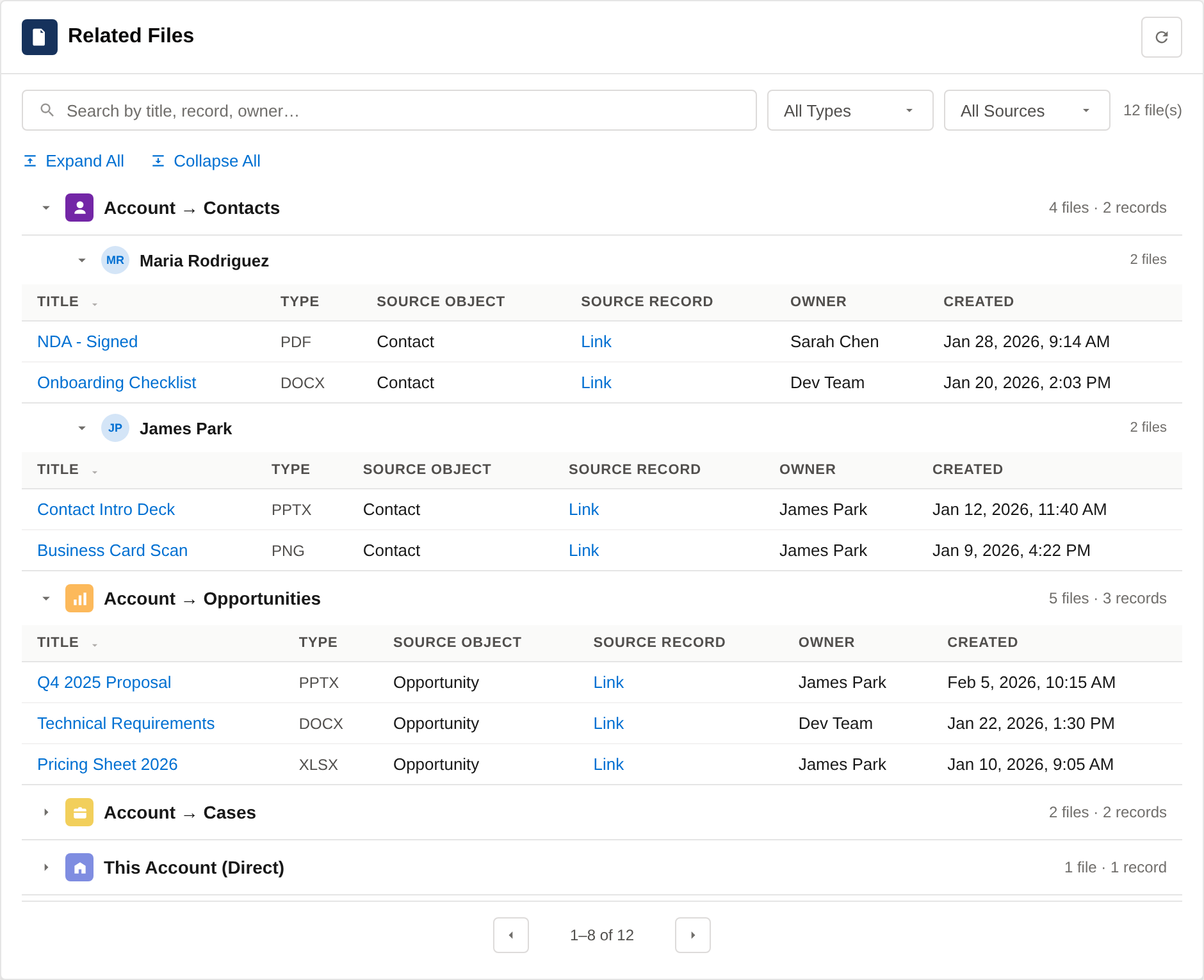
DeepFiles Viewer showing related files rolled up onto an Account record page
Files found across 5 related objects
Who DeepFiles helps

The right files, for whoever's on the record

Every team lives on a different object — but the documents they need are scattered everywhere else. DeepFiles brings them together, in context.

BDR
Prospecting an Account

Blind spot. "Has anyone worked this account before? Are there old proposals or NDAs buried on the record somewhere?"

With DeepFiles. Prior proposals, notes and agreements from the Account and past Opportunities surface up front — so you open the call informed. Account → past Opportunities

Sales Rep
Working an Opportunity

Blind spot. "Is there a signed contract or MSA anywhere? I can't tell what's attached to the Account, its Contacts, or past deals."

With DeepFiles. Every agreement, NDA and order form rolls up onto the Opp — pulled from the Account and its related records. Opportunity → Account → Contacts

Contract Manager
Managing agreements

Blind spot. "Signed originals, redlines and amendments live on whatever record someone happened to upload them to."

With DeepFiles. Every executed agreement, amendment and order form rolled up into one list — wherever it was attached. Account / Opportunity → Contracts

Renewals Manager
Working a renewal

Blind spot. "For a renewal I need last term's contract, the QBR decks and any open cases — all scattered across the account."

With DeepFiles. Prior contracts, success decks and related case files in one place — with filters to flag risk before the call. Filter: prior term + open Cases

Support Agent
Working a Case

Blind spot. "I need logs and screenshots from related cases — and I don't know this account has an open renewal I could put at risk."

With DeepFiles. Related case files in one list — plus a filtered view that surfaces files from open Opportunities, so you escalate with full context. Filter: open Opportunities

Account Manager / CSM
Working an Account

Blind spot. "Onboarding docs, QBR decks, contracts, support attachments — all scattered across contacts, cases and opps."

With DeepFiles. The account's entire document history in one place — ready for the renewal call, no hunting required. Multi-hop: Account → Contacts → Cases

Salesforce Admin
Setting it all up

Blind spot. "Rolling files up 'properly' usually means a custom Apex project — expensive to build and fragile to maintain."

With DeepFiles. Point-and-click relationship paths, stored as configuration — no code, and it enforces your CRUD/FLS security automatically. No code · secure by design

Built for the way revenue, service & ops teams actually work

Sales Cloud Service Cloud Experience Cloud Agentforce Financial Services
The problem

Your files are scattered. Your team pays the price.

In Salesforce, files live on the record they were uploaded to. The contract is on the Opportunity, the signed NDA is on the Contact, the screenshot is on the Case. Finding them means hopping between records — or giving up.

🔍

Wasted hunting time

Reps and agents dig through Contacts, Cases and Opportunities one at a time to find a single document that should be one click away.

🧩

Fragmented context

The full document picture for an account is spread across dozens of related records, so no one ever sees it in one place.

🚧

Costly custom code

Rolling files up "properly" usually means a custom Apex project — expensive to build, fragile to maintain, and hard to change.

The solution

One viewer. Every related file. Zero code.

Drop the DeepFiles Viewer onto any record page and instantly see files rolled up from every relationship you choose — with search, type filters, source filters, and sortable columns.

DeepFiles Viewer component on an Account page
For end users

Everything in one searchable list

The Viewer shows files from the current record and its related records, tagged with where each one came from — Account → Cases Contact → Account Multi-hop

  • Search by title, record, or owner
  • Filter by file type (PDF, DOCX, PPTX, XLSX, PNG…) or source object
  • Sort by any column and preview with the standard Salesforce viewer
  • Paginated results that stay fast on large accounts
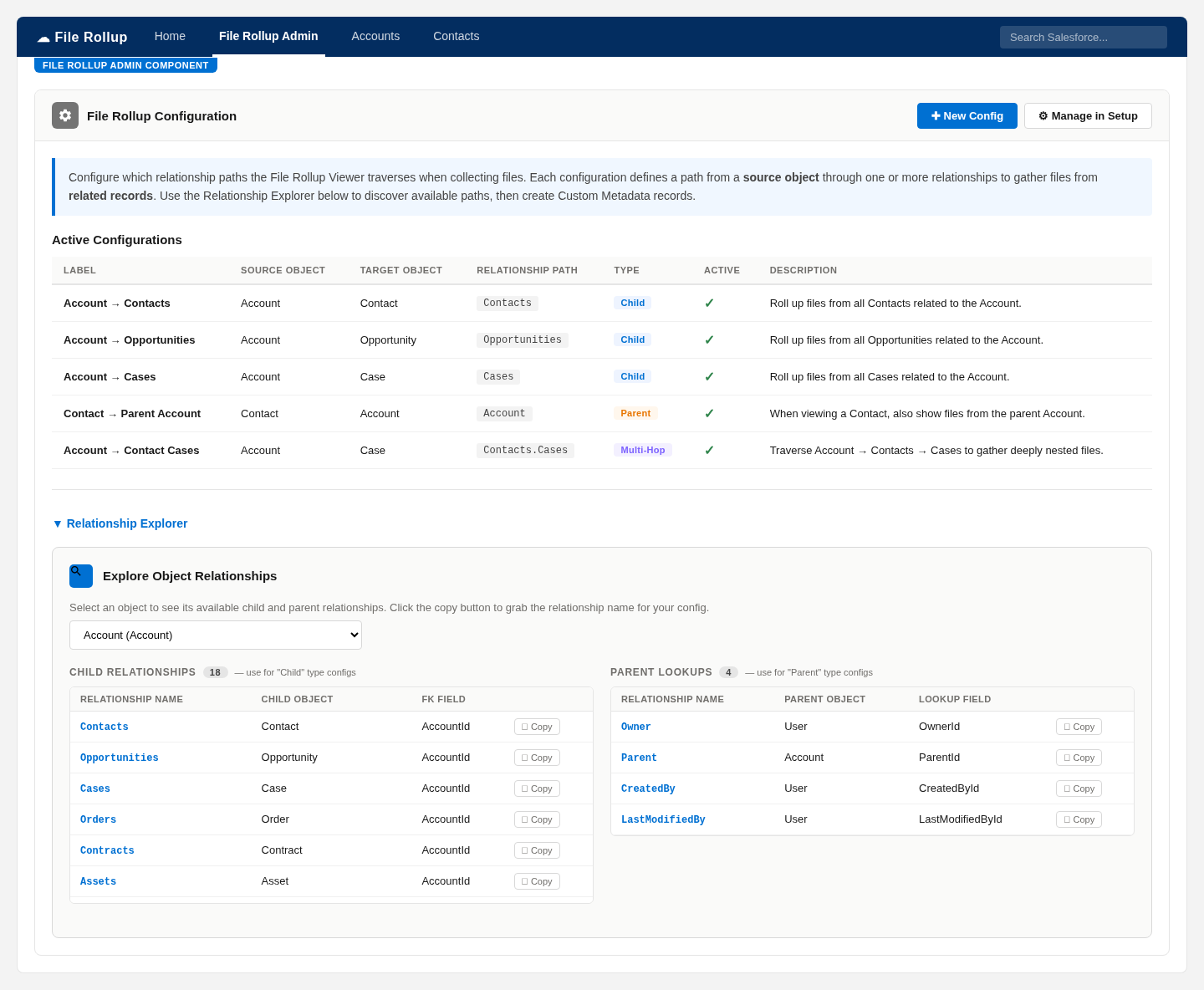
DeepFiles Admin configuration screen with Relationship Explorer
For admins

Configure paths visually — no Apex

The admin console lets you define exactly which relationships DeepFiles traverses. The built-in Relationship Explorer discovers every child and parent path on an object, so you copy the name and go.

  • Point-and-click relationship paths, stored as configuration — not code
  • Child, parent, and multi-hop traversal (e.g. Account → Contacts → Cases)
  • View Groups to organize configs per source object
  • Record filters with AND/OR logic and custom display columns
How it works

Live on your record pages in three steps

1

Install & assign

Install DeepFiles from AppExchange and assign the Admin or User permission set. No dependencies beyond Salesforce Files.

2

Configure paths

Use the visual Relationship Builder to define which related objects to roll up. Save it as configuration — change it anytime.

3

Drop in the viewer

Add the DeepFiles Viewer to any Lightning record page in App Builder. Your team sees every related file instantly.

1 click

to reach any related file, instead of dozens

0 lines

of Apex to add or change a rollup path

Multi-hop

traversal across as many relationships as you need

Why teams choose DeepFiles

Powerful where it counts, invisible where it should be

🧭

Visual Relationship Builder

Discover every child and parent path on any object and configure rollups without touching code.

🪜

Multi-hop traversal

Follow relationships several levels deep — Account → Contacts → Cases and beyond.

🎛️

Filters & view groups

Record criteria with AND/OR logic and view groups keep each page showing exactly the right files.

🤖

Agentforce actions

Optional AI-ready actions let Agentforce retrieve and summarize related files on demand.

🔒

Secure by design

Full CRUD/FLS enforcement — users only ever see the files they already have access to.

⚡

Native performance

Paginated, security-enforced queries keep the viewer fast even on your largest accounts.

Explore all features →
Available now

See DeepFiles on your own data

DeepFiles is live on the Salesforce AppExchange. Install it today, or book a demo and we'll walk you through it on your own object model.

  • A walkthrough on your own object model
  • Free 30-day trial, no credit card
  • Optional guided setup for your relationship paths

Request a demo

Tell us how to reach you and we'll set up a time to walk you through DeepFiles.

We'll only contact you about DeepFiles. No spam, ever.

Available now

Install DeepFiles from the Salesforce AppExchange

DeepFiles is live on the Salesforce AppExchange. Install it in your org and start your free 30-day trial, or book a demo and we'll walk you through it.